
Download MDB Viewer Plus – Database Viewer, Access Database, MDB File, Database Tool, Free Database Tool, Database Utility
Overview
MDB Viewer Plus is a lightweight utility designed for users who need to access, view, and edit Microsoft Access database files (.MDB) without having Microsoft Access installed. This application fills a critical gap in the productivity ecosystem by offering a free, standalone solution for handling legacy database formats that remain in use across various industries, including small businesses, educational institutions, and administrative departments. The software targets individuals and professionals who occasionally interact with MDB files but do not require the full suite of features provided by Microsoft Office.
Its primary function is to provide read and write access to database tables, queries, and structures, enabling users to extract, modify, and search data efficiently. While the app is not marketed as a full database management system, it serves as a practical tool for quick data inspection and minor edits. The developer, MDB Viewer Plus, has positioned this tool as a no-cost alternative for those seeking a minimal yet functional interface for database interaction.
Although the developer did not provide additional technical details, the app’s continued presence in the market suggests a steady user base. Real-world use cases include retrieving client records, updating inventory lists, or auditing data stored in older Access databases. Its role in the software ecosystem is particularly valuable for users who rely on legacy systems and cannot afford or do not need full Access licensing.
Key Features & Functionality
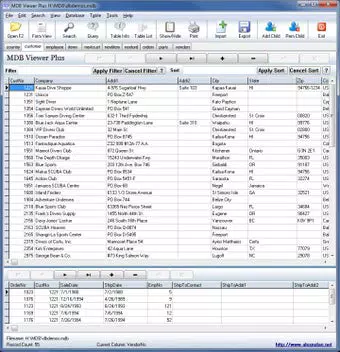
- User-Friendly Interface: The application uses familiar icons and layout patterns found in standard Windows software, reducing the learning curve for users with minimal database experience. Navigation is structured around a tree view of database objects, allowing quick access to tables, queries, and forms.
- Free Access to MDB Files: Users can open and interact with .MDB files without requiring Microsoft Access or Office. This eliminates licensing costs and dependency on proprietary software, making it ideal for occasional users.
- Basic Editing Capabilities: The tool allows users to view, modify, and save changes directly within tables. This includes editing cell values, adding or deleting rows, and rearranging data entries.
- Search and Filter Tools: Built-in search functionality enables users to locate specific records or values across multiple tables. Filters can be applied to narrow down results, improving data retrieval efficiency.
- Export Options: Data can be exported to common formats such as CSV or Excel, facilitating integration with other tools and systems.
For example, a school administrator might use MDB Viewer Plus to update student enrollment records stored in an old Access database. Similarly, a small business owner could retrieve and edit invoice data from a legacy system. These practical applications highlight the tool’s utility in real-world scenarios where full database software is unnecessary but access to data is essential.
Interface, UX & Performance
The user interface of MDB Viewer Plus reflects a design approach from the early 2010s, featuring a dense layout with multiple toolbars and a cluttered main workspace. While the interface is functional, its visual design lacks modern polish, with inconsistent spacing, outdated button styles, and a lack of visual hierarchy. Navigation relies heavily on menu-driven commands and tree views, which may feel unintuitive to users accustomed to minimalist or touch-optimized layouts.
Despite this, the application remains responsive during basic operations such as opening files, browsing tables, and applying filters. Although the developer did not list formal performance metrics, the app’s 12.2 MB file size suggests a lightweight footprint, which contributes to fast startup times and minimal system resource usage. The software runs smoothly on older Windows systems, though performance on low-end hardware may vary.
Responsiveness during editing and search tasks appears stable, with no reported crashes during standard use. However, the lack of visual feedback during edits and limited undo functionality may impact user confidence. Overall, the UX prioritizes functionality over aesthetics, making it suitable for power users who value utility over appearance.
Platform Compatibility & Technical Requirements
MDB Viewer Plus is designed for the Windows platform and is compatible with Windows operating systems. The current version is 2.2.3.0, with a file size of 12.2 MB. The developer did not specify minimum OS requirements, nor did they list compatibility with specific Windows versions such as Windows 10, 11, or older editions.
As a result, users should proceed with caution when installing on newer or less common configurations. The application does not appear to require additional runtime libraries or frameworks, which simplifies deployment. However, since the app was last updated in 2013, users should be aware that it may not fully support newer Windows security protocols or file system permissions.
The lack of recent updates raises questions about long-term compatibility and support. Despite this, the app remains functional on many current systems, particularly those running legacy software environments.
Pros and Cons
Pros
- Free to download and use, eliminating licensing costs
- Allows viewing and editing of MDB files without Microsoft Access
- Lightweight with minimal system resource usage
- Provides basic editing and search functionality for data management
- Supports export to common formats like CSV and Excel
Cons
- Outdated user interface with a cluttered appearance
- Limited to .MDB file format; does not support .ACCDB or newer Access versions
- Installation process may include bundled third-party software
- No recent updates or developer support since 2013
- Lacks advanced features such as query design or data modeling
FAQ
Is MDB Viewer Plus safe to download and install?
The application is available from official sources and does not contain known malware. However, users should carefully review the installation process to avoid bundled software.
Can I edit data in my Access database using this tool?
Yes, MDB Viewer Plus allows basic editing of table data, including adding, modifying, and deleting records directly within the application.
Does it support the newer .ACCDB file format?
No, the tool is limited to .MDB files and does not support the newer .ACCDB format used by Microsoft Access 2007 and later.
Is there a mobile version of MDB Viewer Plus?
Currently, MDB Viewer Plus is only available for Windows and does not have a mobile or iOS version.
How often is MDB Viewer Plus updated?
The last update was released in 2013, and the developer has not released any new versions since. Users should be cautious about long-term compatibility.
Final Thoughts
MDB Viewer Plus remains a viable option for users who need a no-cost solution to access and modify legacy Access database files. While its interface is outdated and the software has not been updated in over a decade, its core functionality continues to serve a niche but important role in the productivity tool landscape. The app excels in simplicity and reliability for basic database tasks, particularly for those who only occasionally interact with .MDB files.
It is best suited for non-technical users, small business operators, and administrative staff who require a lightweight alternative to Microsoft Access. Despite its limitations, the tool offers real value for users seeking a secure, free, and straightforward way to manage Access data. For those needing a reliable database utility without the overhead of full Office suites, MDB Viewer Plus delivers on its promise.
Download MDB Viewer Plus now.


